Wednesday, September 02, 2015

An Internet Idea That Hopped Out Into The Non-Internet World

Internet activities are often modeled on what you might call real-world events. Traditional book tours became blog tours. Traditional book launches became virtual book launches. Moving away from book-related issues, dating became on-line dating. On-line versions of magazines and newspapers were created. But they were still magazines and newspapers, which have existed for centuries.

You see where I'm going with this.

This summer I heard about something that originated on the Internet being copied out here in what the Trek folk used to call the carbon-based world. Here in Connecticut this month we're going to have a Quilt Shop Hop.

Blog hops involve bloggers linking together, usually connecting posts on a similar subject. But I don't recall hearing about anything on that model outside the Internet until I stumbled upon a flyer promoting the Connecticut Quilt Shop Hop at my local sewing store.

This particular hop involves a $7 registration fee, which I believes gets you a mug as well as a "passport." You can take that passport into participating stores for special items. It looks as if there will be a pattern given away. Some stores will be featuring special material or kits. They have a Connecticut Quilt Shop Hop Facebook page. The salesclerk at my local store said a good time is had by all.

Now, yes, I'm interested in this because I made a quilt top this year. And if I was going to be around this month, I'd probably take part in this hop because I need more material for the backing, and two of the participating stores are convenient for me to get to. But why am I writing about it at a writer's blog?

Because in addition to being intrigued by the movement from Internet to brick and mortar store, I see this quilt shop hop as an example of using community for marketing. I've been interested in that for a few years now. I don't know how well this community marketing effort works for these sewing stores, though they've done it five times now, so I'm guessing they must think it's worth it. Presumably they are sharing the expense of promotion. Presumably every store has promotional materials available for this event, meaning they are promoting other stores, even by just mentioning their names.

What if a group of bookstores did something similar? What if every participating bookstore offered a free book to registered hoppers instead of a free pattern? What if every bookstore offered a special event to hoppers? What if every bookstore featured a different local author with a signing, meaning the authors would get  involved with promotion? What if they started promoting the hop months ahead of time, the way the Quilt Shop Hop people did?

How much would promoting the group benefit the individual?

Tuesday, September 01, 2015

Time Management Tuesday: Managing The Beast That Is Twitter With Tweetdeck, Part 2

Last week I covered how-to related to Tweetdeck. This week I'll describe some of what I've been doing with Tweetdeck to make better use of time, to give you an idea of what you can try.

Increasing The Chances Of Your Tweets Being Seen By Scheduling Multiple Tweets


What You Can Do: There are thousands of tweets out there in the twitterverse, more than anyone can absorb. Any individual tweet we send out there has to compete with all those others. Most people using Twitter look at the tweets on the screen in front of them, maybe scroll down a bit. If you post each tweet only once, the odds of it being seen by many people are not great. Tweeting the same material a few times over the course of the day or even several days means you can reach more people. But who has time for that?

What you can do with Tweetdeck is schedule tweets so they are automatically tweeted while you're doing other things. Yeah, writing, of course. On your Tweetdeck page you'll see a blue column to your left. The white box in it is for typing your tweet in. You can immediately tweet it by pushing the "Tweet" box below it. Or you can look down at the next three buttons. One of them says "Schedule Tweets." Yes. That's the one you want.

The blue column has its own narrow scroll bar. I mention that because, yes, I struggled with scrolling there for a bit. So once you've chosen the "Schedule Tweet" box, use the scroll bar to move down a bit to a calendar and squares with the time. You can hit the day and fill in the time you want your tweet to show up. Look above the calendar, and you'll see a box that says "Tweet at...whatever you told it to do." Hit that box. You'll find the tweet you just scheduled has moved to a column called--surprise!--"Scheduled."

Then you can do that again. And again.

What I've Been Doing: I usually do my first tweet in real time shortly before noon. Then I schedule at least two more that day, around two and four. I've read that noon and late afternoon are best tweeting times. People go onto Twitter at lunch time and after work. I'll change the write-up I use with each tweet so I'm not tweeting exactly the same thing, even though I'm tweeting exactly the same link. I may use different #hashtags to get the attention of different groups.

That strategy definitely increases traffic to my blog. I get a lot more views days I do that type of tweeting.

If you blog in the evening to save your daytime for other kinds of work, you can schedule your tweets for the next day.

Increasing The Odds Of Your Tweets Being Seen By Using Images


What You Can Do: Images attract attention on every platform. They're mind-bogglingly simple to do with Tweetdeck. The button for adding images is below your white text box, just as the scheduling tweet box is. You can use it to add any images you have on your hard drive, the ones you've used in your blog. Basically, if you can add images to your blog, you can add them to your tweets with Tweetdeck.


What I've Been Doing: When I tweet a reader response post, I add the cover image to my tweet. I'm going to experiment with other images from the blog as well

.

What I've Been Doing With My Columns


#hashtags: I got started with Tweetdeck because my nephew told me following hashtags had helped him build his Twitter following. I haven't had much luck with that. I may not be spending enough time going through the columns to look for people. I'm mostly scanning for interesting content at this point. The first two hashtags I followed, #kidlit and #YA, turned up a lot of tweets from authors promoting their own work. That's not particularly interesting content. Fortunately, it's very easy to get rid of columns. At the top of each one, there's a strange little two-line icon. Hit it, and you'll find "Remove" down at the bottom. I got rid of my #kidlit and #YA columns.


Now I have columns for #timemanagement, #Egyptology, and #MSWL, among other things. I think it's obvious why I'm interested in seeing time management tweets. (This is a Time Management Tuesday post, recall.) I'm following Egyptology because of that mummy book I'm working on. When I see something interesting there, I retweet it. My goal with that is to let my followers know that Egyptology is something I'm interested in. If that book ever gets published, I will have a little history with ancient Egypt. In fact, a couple of times my #egyptology retweets have been picked up in an Egyptology on-line publication that collects tweets on that subject.  The MSWL column is for "Manuscript Wish List," something agents and editors tweet periodically on twitter. I was not able to spend any time following that the day they did it this summer, so I created a column to collect those tweets, so I can look at them another time.


What I'm doing so far is using hashtags to pull subjects I'm interested in out of the flood of tweets. I've been able to do a lot more with this information than if I'd been hoping to see it racing by my screen all in one stream.


Lists. Whenever I follow new people/organizations on Twitter, I immediately add them to a list. We're talking agents, publications, writers, things like that. If you go back to the screen of options, you'll see that you can make a column with your lists. It's incredibly easy to do. List columns are another way to pull information out of your Twitter stream and put it somewhere you might actually see it. 


The lists have been great. I have a list of publications I'm interested in. Earlier this month, one of them tweeted that it was opening for submissions for a couple of weeks. So I submitted. I have a list column of Connecticut writers. One of them tweeted that she's interested in hosting guest bloggers this fall. I've made a first contact regarding that.


Flexibility. Because columns are so easy to make and delete I can change them depending on my needs and interests. Oh, wow. That makes them situational, doesn't it? You can adapt them to whatever your situation is at any particular moment.


My Tweetdeck experience began because I was talking shop at a family gathering on the Fourth of July. At a family member's rehearsal dinner, I was talking shop with the best man who got me interested in Instagram. I'll look into that this fall.

Saturday, August 29, 2015

September Connecticut Children's Literature Calendar

The school year begins, and we have a little more happening.

Sat., Sept. 12, Elizabeth Howard, Elm Street Books, New Canaan Noon to 2:30 PM

Sat., Sept. 12, Sandra Horning, Bracken Memorial Library, Woodstock Academy, Woodstock 10:00 AM

Sat., Sept. 12, Erin Bowman, Barnes & Noble, Canton 1:00 PM


Thurs., Sept. 17, Brian Selznick, First Congregational Church (sponsored by R.J. Julia), Madison 7:00 PM Ticketed event

Fri., Sept., 18, Brian Selznick, von der Mehden Recital Hall, UConn, Storrs 7:00 PM

Sat., Sept. 19, Marcia Goldman, R. J. Julia Booksellers, Madison 10:30 AM

Thurs., Sept. 24, R.L. Stine and Marc Brown, First Congregational Church (sponsored by R. J. Julia), Madison 5:00 PM Ticketed event

Fri., Sept. 25  Leslie Bulion, Durham Fair Youth Exhibit,  School groups will visit with Bulion. Other fair goers can check the daily schedule for presentation times.

Sun., Sept. 27, Local Author Extravaganza including unnamed children's authors, Barnes & Noble, Glastonbury 12:00 PM 

Friday, August 28, 2015

What Did You Do Last Week, Gail? August 28th Edition

Goal 1. The Mummy Book. I'm not talking about it. Except for...the 1600 words I did today! Which is massive for me. No commenting on that fact, please.

Goal 5. Community Building. Finished the Connecticut Children's Lit Calendar. The e-mail newsletter is being prepared. Submitted an application to become a Cybils' second-round judge. Made an initial contact about doing a guest post at another blog. Got into a community discussion at a Connecticut women writers' Facebook page. Took part in a blog tour.

Goal 7. General Marketing/Branding I got a blog post done for posting while I'm on vacation.

Wednesday, August 26, 2015

Today's Stop On The "Fab Four Friends" Blog Tour: Those Boys Could Work


 I may be the only blogger taking part in the Fab Four Friends blog tour who is not a major Beatles fan. I enjoy the music, respect the musicians, but never wanted to marry Paul. I was very taken with the Fab Four Friends: The Boys Who Became the Beatles by Susanna Reich with illustrations by Adam Gustavson, but not because I think the next generation absolutely must be exposed to these musicians. Instead, I liked Reich's portrayal of "the boys" training themselves to live a life with music.

Reich writes about John Lennon rehearsing in his mother's bathroom with some "mates." "...pounding out souped-up folk songs and some rock 'n' roll. They had no idea how to play, but they loved making noise--lots of noise!" He met Paul McCartney when Paul saw him playing at a church fair. John was impressed because Paul could tune a guitar correctly. The two of them got together "bashing away" on guitars. "Most of the time they tried to imitate the hard-driving songs on the radio." "If only they could figure out the chords!" George Harrison seems to have been better at working out those. "...he knew a lot of chords." When he came into the picture, he taught them to John and Paul.

Reich also covers the Hamburg (still pre-Ringo) period. To digress, just a little, Malcolm Gladwell writes in Outliers about the significance of Hamburg for the Beatles. The many hours of performing, he claims, contributed to the thousands of hours of practice he believes is necessary to become proficient at a skill. When they left Germany, Reich says, George was only seventeen years old. They had put in all that time and effort when they were still what most of us would consider kids.

Fab Four Friends is for young readers, and the title itself is all about youth. "Friends," is one of the biggest concerns of childhood. "Boys," is a state of childhood. What I like so much about this early Beatles' story is that it addresses how hard these guys worked while they were very young. Yes, they were still young when they became successful. But the success didn't come until after they'd worked. They didn't just toss up the 1960's version of a YouTube video and become international stars.

This picture book group bio is probably most appropriate for older gradeschoolers. However, I wonder if it wouldn't also be a good choice for reluctant readers on the middle school level.

Tomorrow's stop for the blog tour will be at Tales from the Rushmore Kid.  You can catch everything Fab Four here.

Correction: This post originally stated that both George and Paul left Germany because the authorities there found out they were under 18. Only George went back to England for that reason.

Tuesday, August 25, 2015

Time Management Tuesday: Managing The Beast That Is Twitter With Tweetdeck, Part 1


Social media is important to writers, whether it really works or not. It takes up a lot of time, whether it really works or not. Soon after getting started on Twitter, I looked into one of the programs that's supposed to allow users to schedule tweets because that's supposed to help with the time part. It looked so complicated, I thought it would just be easier to keep doing what I was doing. Whether it really worked or not.

This past Fourth of July, my nephew, who is part of a group blog and a Twitter user, told me about Tweetdeck. What interested me was that in addition to using it to schedule tweets, he said he used it to check out interests/hashtags and find new people to follow. Following others is a way to increase your own followers. I thought, Who doesn't want more followers? So I decided to look into it.

It took a while to get the hang of it, but I'm loving Tweetdeck now. It is a time saver. Additonally, I can save you some learning time by explaining what I did, so you can do it without dealing with my struggles.

Twitter page--Masses of tweets lost in one column
What Is Tweetdeck?

Tweetdeck page--Masses of tweets in multiple columns by subject
Like everything else in life, all the information the Tweetdeck people give you makes sense, once you understand it. Until then, think of Tweetdeck as a way of organizing your Twitter stream. I go further and think of it as a filing system. I understand filing. Good filing makes a difference in managing time. When you have hundreds of pieces of paper, if you can break them up into categories and organize them that way, you can find what you want. When you have thousands of tweets, if you can break them up into categories and organize them that way, you can find what you want. Or more of what you want, anyway.

Getting Started

Quite honestly, when I went to Tweetdeck the first time, my Tweetdeck page came up with columns called "Home" (which was my Twitter feed from my regular Twitter page), "Notifications," and "Messages." "Notifications" and "Messages" were the same "Notifications" and "Messages" that appear in the drop down menu on a regular Twitter page. (Twitter owns Tweetdeck now, you might have guessed.) They were just in columns so I could see them immediately without having to make any effort.

So Tweetdeck gave me my start. My starting point was what I had on my traditional Twitter page, but organized in columns.

Building On The Start


Look for the black column on your left
To build on your start, you're going to want to add more columns. To do that, all you have to do is go over to that narrow black column on the far left that I've done such a poor job of copying for you. Look for the + sign. You know, + as in add. 

When you hit that, you get a screen full of options  that you can, indeed, add to your Tweetdeck page. They are all different kinds of columns.

Remember, the Home column is your traditional
Screen full of options
Twitter feed. If, like me, you removed your Home and Notifications columns, you can easily put them back up. If, like me, you put everyone you followed on Twitter into lists the moment you followed them, you can make columns for any of those lists. You can make columns for any of the subjects you see here.

Hit one of these options, follow the instructions. Be sure to hit "Add Column" at the bottom of the screen. (That's right. I didn't do that at first and couldn't understand why nothing was happening.)

But What About Hashtag Columns, Gail?


Now this is where I can really save you some time. I had to do some hunting to figure this one out.

To make a hashtag column, you select "Search" from that screen full of options. Ta-da! In the little box that pops up, you type #whateveryouwant. By that I mean whatever hashtag you want to make a column for. Once you do, you'll get the box to your left. I ignore everything in it and hit "Add Column."

Now, what if you want to cut down on the number of columns by including two hashtags in one of them instead of one hashtag in two of them? Bless you, Alice Keeler at Teacher Tech for 'splaining how to do this, because I really wanted to give it a go.

This is one of those things that is mind-bogglingly simple, once you know how to do it. In that little box that pops up when you select "Search" you type both the hashtags you want to search for separated by the word "OR." As in:

#graphicnovels OR #comics

Whatever you do, don't type:

#graphicnovels AND #comics

If you use "AND," you'll only get tweets that use both hashtags. OR means you'll get tweets with either hashtag. This OR vs AND  thing is supposed to have something to do with Boolean logic, whatever the hell that is. But it's a cool term to use, and this is probably going to be my only chance, so there it is.

In case you hadn't noticed, you need to cap the OR.

So this is the how-to portion of our program. Next week I'll cover my positive experience with Tweetdeck once I figured out this stuff. I'll include scheduling tweets and attaching images.                                       


Saturday, August 22, 2015

What Did You Do Last Week, Gail? A Day Late

Goal 1. The Mummy Book. Did I make any progress on this at all? Mmm. I did come up with the big idea for the ending last weekend. But how to get there? Late Thursday afternoon I began thinking about Osiris and Isis. Yeah, maybe they will help.

Goal 5. Community Building. Worked on the Connecticut Children's Calendar.

Goal 7. General Marketing/Branding. Blogging. Tweeting. Yada yada. Also listened to a very good podcast today that I'll be writing about some Time Management Tuesday.

Thursday, August 20, 2015

Cybils Awards Looking For 2015 Judges

My legions of long-term fans are well aware of my love for the Cybils awards, because I've written about them a number of times. Since the award is celebrating its tenth year, yes, a "number of times" means "a lot."

On Monday, the Cybils put out the call for this year's judges. If you are an active children's/YA lit blogger, you may want to consider taking part.

I may apply to be a Round 2 Judge this year.

Wednesday, August 19, 2015

My Personal Shirley Jackson Photo Album

Okay, so get this. We were in Bennington, Vermont this past weekend. The North Bennington section of Bennington is where Shirley Jackson lived with her husband and children. Saturday night, after dinner, we did a Shirley Tour. I used information from these readings to plan it. I can't be certain of that info's accuracy, but it provided me with an incredible hour.

Where to begin?

Let's start with the house the Jackson family lived in. This turned out to be pretty easy to find because some of those other sites I mentioned gave her street name and included pictures of the house. I'm not going to name the street for the sake of the people who live there now. I am showing my gratitude, because no one called the police on me while I was there taking the pictures I'm showing you.

We hadn't been on the street long, when I started shouting, "That's it! That'sitthat'sitthat'sit!" My husband's immediate response was, "Perhaps I should drive."


I am not totally without shame. This side view of the house was the first picture I took, because I thought it was less intrusive than standing across the road and taking a picture head on. I got over that. We even have a picture of me standing in front of the house. It is not flattering of the house. Oh, who am I kidding? It's not flattering of me.

What I'm showing you now is the street leading up the hill to the Jackson house. I've read that Shirley was pushing a stroller up this street when she got the idea for The Lottery. Needless to say, I walked up it, too.


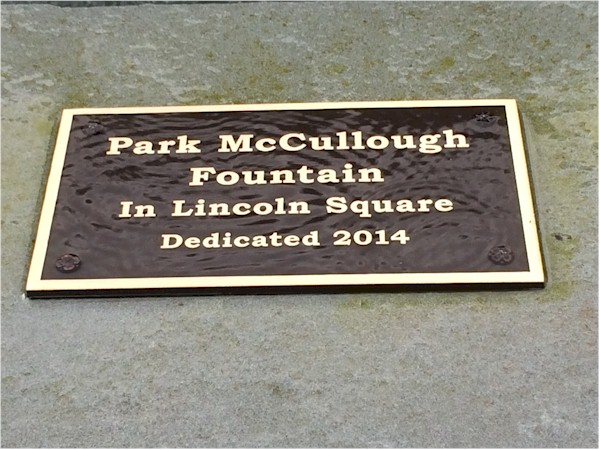
According to my reading, Shirley based the town green in The Lottery on Lincoln Square in North Bennington. Sure enough, Lincoln Square is right down the hill from the Jackson house. I don't remember a fountain in The Lottery, but the plaque I found suggests it wasn't there back in Shirley's day.

I'd read that I shouldn't expect to see any remembrance of Shirley in the Bennington area. However, Lincoln Square has an array of commemorative bricks, and there's one there for Shirley and The Lottery.


Finally, I read just last week that Shirley did her grocery shopping at Powers Market. Yowsa! It is still there! Talk about nerve! Not only did I have my picture taken in front of it (again, I did not flatter the store), I looked in the windows. (It was closed.) The interior looks remarkably like the interior of a store at a crossroads in Whiting, Vermont when I was a girl. We only went in for things like ice cream and bread, but I sort of shopped at a store like the one where Shirley shopped!

Powers Market is across from Lincoln Square, and they are both at the foot of that hill Shirley walked up with her stroller while she came up with The Lottery. It makes for a tight little loop, down to the store and back. I wonder how often she made it. A website about the town of North Bennington includes this line: "...her biographer, Judy Oppenheimer, describes a strained relationship between Shirley Jackson and the villagers of North Bennington." I've read that sort of thing frequently over the last few years. And now I can think about Shirley walking down that hill and back with a small child, probably over and over and over again.


Tuesday, August 18, 2015

Time Management Tuesday: A Beginning And Ending Rerun

I'm working on a big TMT post on the wonders of Tweetdeck. However, Blogger won't let me use my screenshots, which I really want for illustration. So I need some more time to work that out with my computer guy, who is not going to be happy about this. I also need to work on next month's Connecticut Children's Lit Calendar.

Most of all, I am rushing/struggling to finish the mummy draft before Labor Day Weekend because I'm leaving for a trip the next day. I have a specific unit of time in which to do this, this summer, which is ending soon. When I get back from vacation, a new unit of time will start, one in which I want to do some other things related to the mummy project, but not the first draft.

Since I am experiencing the end of a unit of time (something I always find exciting, even if there is pressure) and coming up on the beginning of another (exciting, exciting, exciting.), I've decided that rerunning a blog post from June 19, 2012, one on beginnings and endings, will make the best use of my time today. It also introduces the idea of situational time management. Indeed, the end of this summer unit of time I'm working with means that I am dealing with a specific situation--finishing up--totally different from the situation I'll be dealing with when I'm back at work in October. Different situations require different time management from us.


 The Significance Of Beginnings And Endings


When I say that beginnings and endings are significant, I'm talking about the beginnings and endings of units of time, not manuscripts.

The beginning of a new calendar year (I've written many times here, I'm sure, about how much I love the month of January), a new school year, and summer break...fun times, huh? We tend to get excited about our plans for "new" blocks of time. Oh, what we're going to do this Christmas season! NaNoWriMo! May Days! If we can perceive some upcoming time as something new, as something different, a change, it's far easier to believe that we can make a change in how we're going to behave in that new chunk of time than it is to believe we can just change what we're doing now in this ho-hum unit of time we've been living in.

If we think about the unit system I wrote about back in February and the research that suggests that people are productive for the first 45-minutes that they work, there may be some logic to our love of new beginnings. Experience has taught us that we're more productive when we start something new, and we like feeling productive. We like the surge of starting something new. I swear, we once got new living room furniture, and just that change led me to start a new plan to keep everyone from eating in the living room. That probably didn't even last 45-minutes, but I remember the rush I felt not because I had a new couch and two new chairs all at the same time, but because the new furniture changed something and I was going to do something different because of it.

The end of a unit of time is a different story, particularly if things haven't gone well during the time period that is drawing to a close. Take last week for me, for instance. I ended up taking one elder to a doctor's appointment on Monday, wasting a lot of time Tuesday reading a book (on my Kindle!), visiting an elder on Wednesday, visiting the first elder again on Thursday (as well as doing life maintenance work while I was out of the house). It got to be mid-day Friday, and I thought, Ah, the week was wasted, anyway, I might as well surf the 'Net. And start again next week when a new unit of time will begin.

In this situation, you can see the parallels between applying self-discipline to work and applying self-discipline to "problems" such as eating, smoking, etc. Oh, this day of dieting is ruined, anyway, because I ate a second cupcake. I might as well eat a couple more and start again tomorrow. How much time is wasted at the end of a bad work unit because we're too disappointed in what we've accomplished to continue? And how to make better use of that time?

Well, yes, we could suck it up and apply some self-discipline, but if you aren't aware that I'm low on that, you haven't been reading this blog regularly. I wanted to come up with another way to make better use of those bad ending hours. While driving home from my taekwondo class last night, I did. (This is an example of a breakout experience, by the way. I'd been thinking about this situation for three days, and an idea for a solution came to me after an hour of practicing joint locks and knife defense.)

Doing absolutely anything work-related during those lost hours at the end of a unit of time  would be better than just blowing them off because things didn't turn out the way we planned in the days leading up to them. Anything. So we can keep fallback work to do then. For writers, this will not be difficult. We have piles of promotional work, research, projects that we've started and not finished that we could shift to when we realize that we're blowing off time. Filing. Checking up on the status of submissions. A table covered with three inches of books and paper in the office. (Oh? That's just me?) Getting some of this stuff done will positive in and of itself, but getting it done will also free up time in the future for other kinds of work. Win-win, as they say.

How am I going to do those things when I've just mentioned that I'm weak on self-discipline? The plan (And I love a plan! It's as if I'm starting a new unit of time!) is to plan for those situations. The plan is to have fallback tasks ready for when the first task doesn't pan out.

I am going to call this Situational Time Management. I will write more about it next week, since I just came up with the idea as I was getting off the stationary bike less than two hours ago. Any idea benefits from thought.